Financial Aid

Student Employment

Work study at Union is based on need as determined by the FAFSA and CSS Profile. The program is administered by the college and offered to students as part of their financial aid package. Authorized annual earnings will be indicated on the financial aid offer letter. The base pay rate for all work-study positions is $9.70 per hour.

Work study earnings are not directly applied to the student’s account. Most students use their earnings for personal and book expenses. Students are able to make payments to their account from work study earnings, but this is not an automatic process.
Work Study FAQs

  • How do I know if I'm eligible for work study?

    If you are eligible for work study, it will be included on your financial aid offer letter each year. Please refer to your offer letter in Self Service if you are unsure.

  • If I don't qualify for work study, can I still work on campus?

    Yes! Students who do not qualify for work study can be hired as student workers in different departments on campus. Students can search for these positions using the Student Careers page on Human Resource's website.

  • How do I apply for work study positions?

    Available work study positions can be accessed via our Careers at Union webpage. Please follow these directions based on your student type:

    Students with Workday login capability (Current students that have done work study before):

    • If you are returning to the same work study position for the next academic year, no action is required unless specified by your supervisor
    • Apply quickly and easily within Workday
    • Review the following Job Aids for detailed instructions

    Students without Workday login capability (Incoming first-year students, transfer students, and students that have not done work study before):

    • Apply through our website at jobs.union.edu - click on the ‘Union College Student Employment Opportunities’ button
    • Review the Job Aid, How To Apply For A Job, for detailed instructions
  • I am a current student who wants to switch work study departments. What do I do?

    You should apply to any open positions available in Workday. Once you receive an offer, please notify Financial Aid and HR that you are switching departments. Notify your old supervisor that you are leaving and your new supervisor will receive a message in Workday to accept your transfer.

  • Where can I see my application statuses?

    For first-time work study students, you should log into the Student Careers page with the log in criteria you used when you initially applied. There, you will be able to see the status of all pending applications. For current students with Workday access, you can log into Workday to track application statuses.

  • How will I know if I am hired for a position?

    You will receive an email notification of an offer being available for a position. You can follow the link in the email to accept or decline the position. *Note: if you used a personal email to apply to a position, the offer notification will be sent to that email.

  • What if I receive more than 1 work study offer?

    We encourage students to accept their preferred position and promptly decline any other offers and pending applications.

  • Can I work more than 1 work study job?

    It is not recommended for students to split their work study hours between multiple positions. Students must contact the financial aid office for approval if they wish to do so.

  • Is there a limit to the number of hours I can work each week?

    Yes, based on your financial aid package you are given a certain work study ‘allotment’ for earnings for the year. All work study students receive an email in late August outlining their specific offer, including maximum earnings and number of hours per week.

  • Are work study earnings automatically deducted from my student bill?

    No, work study earnings are paid directly to the student and are never reflected on the billing statement.

  • How often am I paid?

    Students are paid bi-weekly based on the hours logged for those pay periods. To review the pay period and payment dates, visit the payroll website.

  • Can I be paid through direct deposit or will I receive a check?

    Students are encouraged to sign up for direct deposit or checks will be held in the mailroom on pay days for pick up.

  • Where and when do I log my work study hours?

    Work study hours should be logged in a timely manner via Workday, located on a student’s My Apps Dashboard. If a student does not have access to Workday, then they should contact hr@union.edu and stop working until their access is resolved. There are JobAids available to assist students with logging their hours. Students are encouraged to log their hours as they are worked, but all hours must be logged by the last day of the pay period (every other Friday at midnight).

  • What days can I work each term?

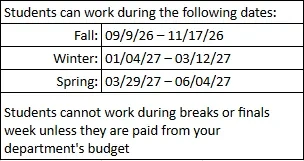
    Students may work starting the first day of classes and ending the last day of classes. Students may not log work study hours during exams or breaks. See the table below for exact dates for each term:

    Term dates work study
  • If I’m on a term abroad, can I make up the hours I miss when I am back on campus?

    No, due to budgetary restrictions, students on a term abroad should only work their normal hours when they are back on campus.

  • I don’t have access to Workday on my MyApps Dashboard; what do I do?

    Contact hr@union.edu to find out what information you are missing in order to be cleared to work and receive your login information. DO NOT WORK until you have access to Workday and the ability to log hours.

  • If this is my first time working at Union, are there any steps I need to complete before I can start working?

    Yes! Once you have accepted a job offer and declined any pending applications, you will receive information with a temporary login for Workday. Here, students must complete new hire paperwork (electronically), which gets submitted to HR through the system. *Note: original documentation verifying the student’s identity and employment authorization is required for the I-9 form and must be brought in-person to Human Resources, located in College Park Hall. Any questions, students should contact hr@union.edu.

    International students must first apply for and receive their social security card before they can be cleared to work. International Advising will assist with this process once they are on campus.